
A Pomodoro Timer for Mac Without a Subscription
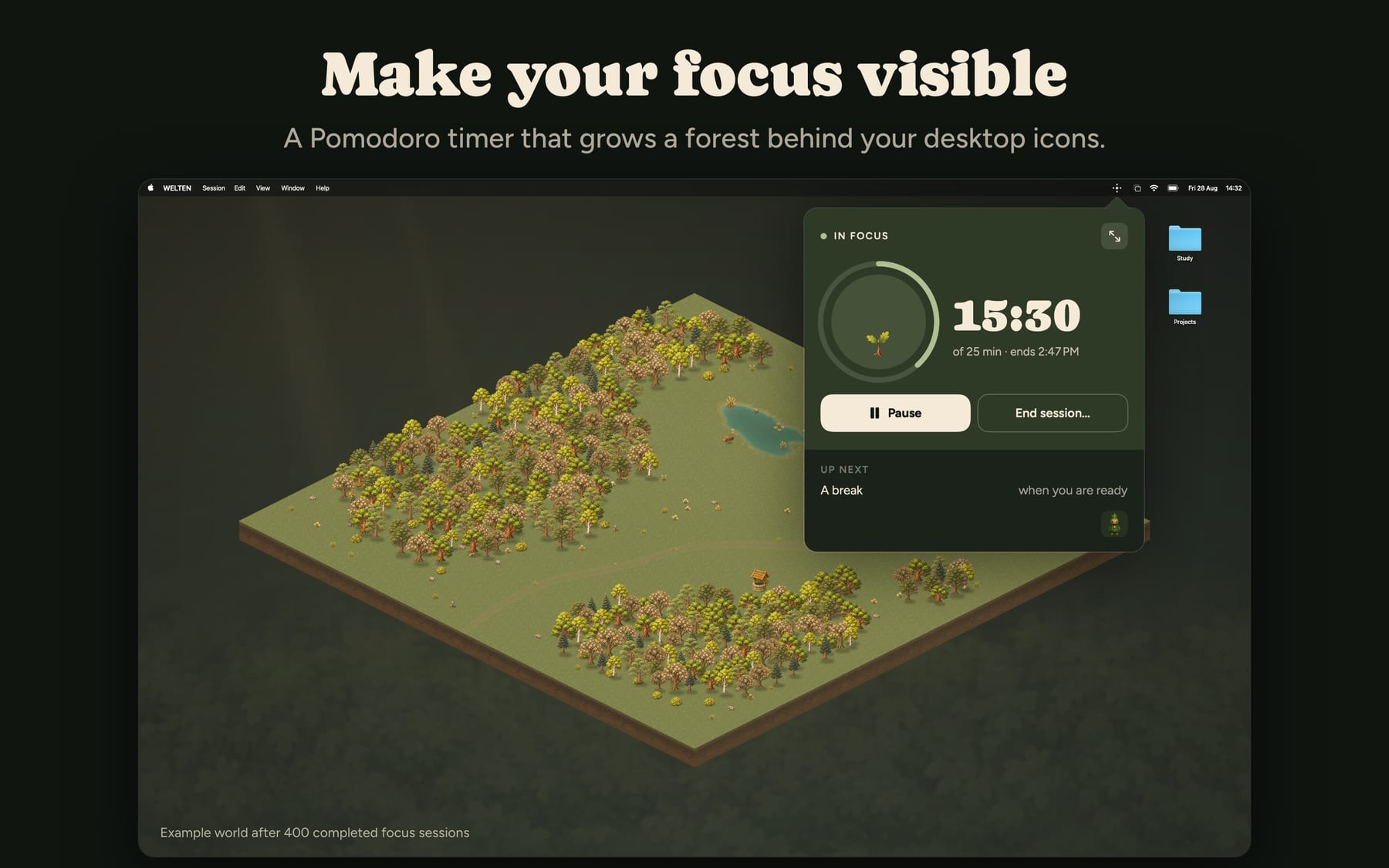
WELTEN is a Pomodoro timer for Mac that you buy once. Your first 10 completed focus sessions are free, then it costs €14.99 once, with no subscription and no account. Every session you finish plants a tree that stays behind your desktop icons.
For Apple Silicon Macs with macOS 14 or later. The app is in English.
What WELTEN costs
WELTEN has no subscription. Your first 10 completed focus sessions are free, with no time limit, no account and no payment details. Cancelled sessions and breaks are not counted.
After that, one purchase of €14.99 unlocks WELTEN without an expiry, including all published 1.x updates. Later major versions, extra worlds and services are not automatically included. Euro prices include applicable tax.
The direct download activates on two personal installations and keeps working offline after activation. The Mac App Store edition also starts with 10 free sessions and unlocks with one in-app purchase. Each edition keeps its own purchase and forest.
What the Pomodoro timer does
By default you focus for 25 minutes, take a 5-minute break, and get a 15-minute break after four rounds. You can change every value, let breaks and the next round start on their own, or pick any length from 1 to 180 minutes.
You start a session from the timer in the menu bar, or press Option-Command-F in any app. Each session can belong to a project and to a task from Apple Reminders, and WELTEN can switch on macOS Focus or Do Not Disturb through Shortcuts while it runs.
For sound, you can play forest ambience, white, pink or brown noise, Spotify or YouTube during a session. Projects, history and statistics stay on your Mac.
What a finished session leaves behind
When a session ends, a tree appears in a forest clearing that runs quietly behind your desktop icons. Your wallpaper stays exactly as you set it, because WELTEN draws in its own layer below the icons.
You choose from seven tree families: Oak, Birch, Sakura, Ginkgo, Ume, Momiji and Sugi. A session you stop early plants nothing, but no tree ever withers and there are no streaks to lose. After 500 finished sessions the forest moves to an archive and a new one begins.
How WELTEN compares with other pay-once Mac timers
As of 9 November 2026, several other native Mac Pomodoro timers also work without a subscription. Most of them count down in the menu bar. Among the timers in this table, WELTEN is the one where each finished session adds something you can see on your desktop.
| App | How you pay | On the Mac | Beyond the timer |
|---|---|---|---|
| WELTEN | 10 sessions free, then €14.99 once | Native app for Apple Silicon, macOS 14 or later | A tree behind your desktop icons for every session you finish |
| pomo™ | Free 3-day trial, then a one-time purchase; Family Sharing | Menu-bar app, macOS 14.6 or later | An intention that scrolls in the menu bar while you work |
| TickingFocus | Paid up front, no subscription | Always-visible timer clock, macOS 13.3 or later | Nothing beyond the timer, by design |
| Kofe Flow | Free; Lifetime Pro as one purchase, with no subscription. One purchase covers Mac and iPhone | Menu-bar app, macOS 14 or later; also on iPhone | Focus Guard blocks chosen apps and websites on the iPhone; Pro adds Mac–iPhone sync and longer history |
| Pomo Timer | Free; Pro as a lifetime purchase or a monthly subscription | Menu-bar app, macOS 15 or later | A daily plan, today’s progress and iCloud sync between Macs |
| Be Focused | Free; Pro monthly, yearly or as a lifetime purchase. Be Focused Pro is also sold as a separate paid app | Native app, macOS 12 or later; also on iPhone and iPad | Tasks and reports; Pro adds sync and app and website blocking |
| TomatoBar | Free and open source (MIT licence) | Menu-bar app from GitHub or Homebrew, not the Mac App Store; macOS 11 or later | A global hotkey, a JSON event log and URL commands for scripts |
| Session | Free; Pro by monthly or yearly subscription | Native app, direct download; also on iPhone and iPad | Analytics and a reflection question; Pro adds blocking on the Mac |
Sources: the Mac App Store listings of pomo™, TickingFocus, Kofe Flow, Pomo Timer and Be Focused and Be Focused Pro, the TomatoBar repository, and Session pricing. Session is included as a subscription-only app for comparison. Amounts vary by region and change often, so the table lists pricing models only.
Some of these apps sell Pro both monthly and once, so check that you picked the lifetime option at checkout.
Who WELTEN is for
WELTEN fits if you work or study on a Mac for hours, want finished focus time to show up somewhere you look every day, and would rather pay once than every month.
It blocks no apps or websites, has no iPhone app and needs an Apple Silicon Mac. If you need blocking or a phone app, one of the other timers in the table is the better choice.
If you’re coming from Forest on the phone, the Forest alternative for Mac page compares the two in more detail.
Plant your first tree free
Your first 10 completed focus sessions are free, starting with a short guided session during setup. They need no account or payment details and never expire. When you’re ready for more, buy WELTEN once for €14.99.
The Mac App Store edition also starts with 10 free sessions. Each edition keeps its own purchase and forest. WELTEN needs an Apple Silicon Mac with macOS 14 or later, and the app is in English.
Written by Anastasia, who makes WELTEN. pomo™, TickingFocus, Kofe Flow, Pomo Timer, Be Focused, TomatoBar and Session belong to their makers. WELTEN is independent and not affiliated with any of them.