
Live Wallpaper Focus Timer for Mac
WELTEN is a Pomodoro timer for Mac that plants a tree behind your desktop icons for every focus session you finish. The trees stay, so your desktop slowly fills with the focus time you’ve put in.
For Apple Silicon Macs with macOS 14 or later. Your first 10 completed sessions are free, then €14.99 once.
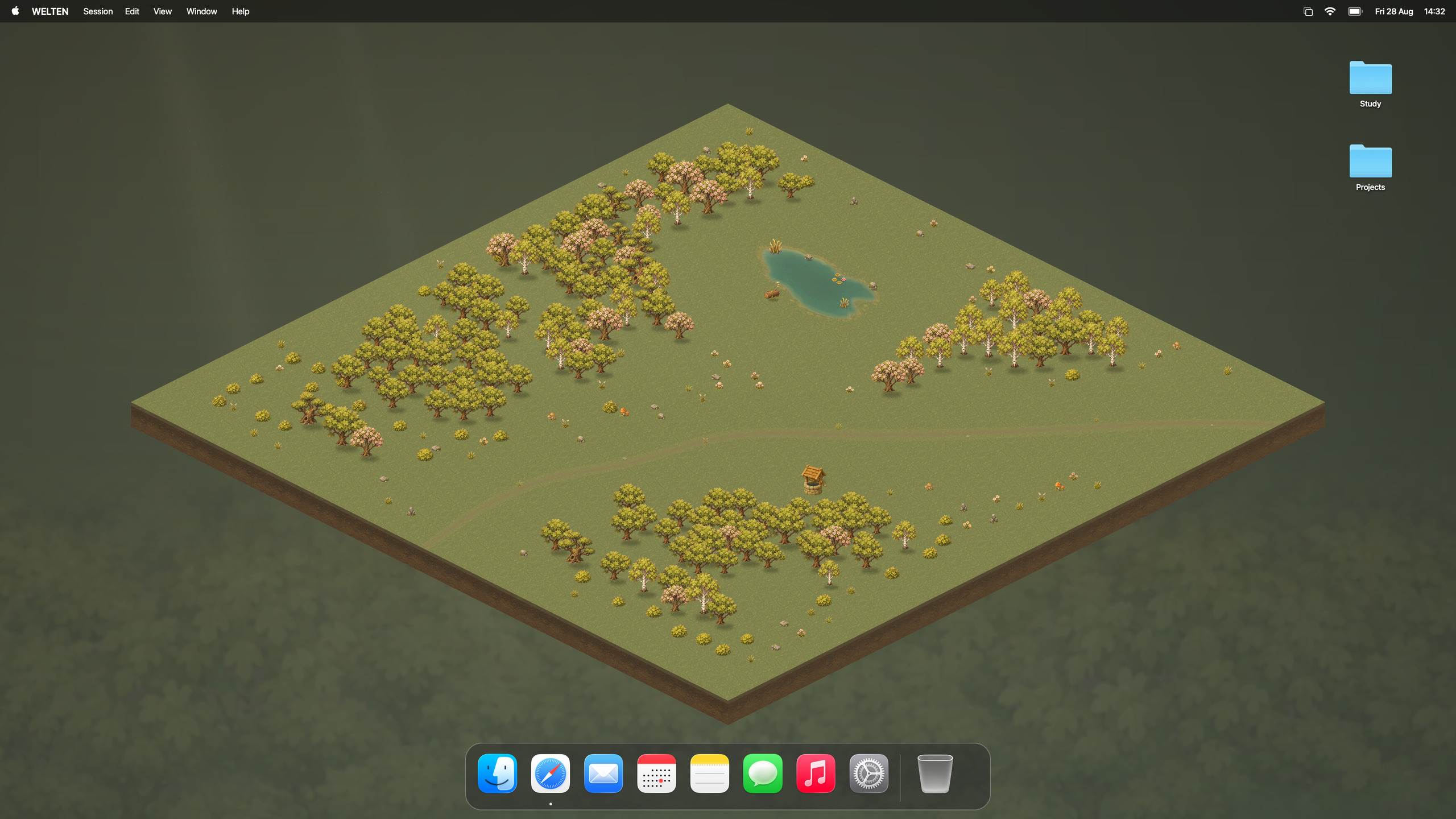
Is there a focus timer that grows trees on the Mac desktop?
Yes. As of 9 November 2026, WELTEN plants one tree behind your desktop icons for every focus session you finish and keeps all of them. Zen Timer, which MacStories reviewed in 2015, grew a tree on the desktop during each work interval, but it no longer has a Mac App Store listing. Snow Focus and MOODy change how the desktop looks during a Pomodoro, and neither listing describes anything that stays after the session.
How a forest sits behind your desktop icons
WELTEN leaves your macOS wallpaper as it is. It draws the forest in its own window below the desktop icons, so your files, folders and the Dock stay where they are and work as before.
You start a session from the menu bar, or press Option-Command-F in any app. The default is a 25-minute Pomodoro with breaks, and any length from 1 to 180 minutes works. When the session ends, a tree appears in the clearing. You choose from seven tree families: Oak, Birch, Sakura, Ginkgo, Ume, Momiji and Sugi.
A session you stop early plants nothing, but the trees you already have stay, and there are no streaks to lose. A clearing holds 500 trees before the next chapter begins.
While nothing is growing, the forest redraws about once a second. WELTEN follows Reduce Motion, has a lower-performance mode, and shows the forest on your main display or on all displays.
If you’re coming from Forest on your phone, the Forest alternative for Mac page covers that switch. The Pomodoro timers without a subscription page compares timers you can buy once, and the gamified Pomodoro timers page compares timers that reward a finished session.
Mac apps that change your desktop while you focus
| App | On your desktop | Tied to your sessions | How you pay | Where to get it |
|---|---|---|---|---|
| WELTEN | A forest clearing behind your desktop icons; your own wallpaper stays as it is | Every finished session plants a tree that stays | 10 sessions free, then €14.99 once | Mac App Store or direct download; Apple Silicon, macOS 14 or later |
| Zen Timer | A generated tree, in a window or directly on the desktop | The tree grows during a work interval and drops its leaves at the end; a new tree each time | $4.99 when MacStories reviewed it in 2015 | No Mac App Store listing found on 9 November 2026 |
| Snow Focus | Snow, sakura petals or rain over the desktop; snow settles on window edges | Snow starts 15 minutes into a focus session, and each break opens with a heavy flurry | Free download | Mac App Store, macOS 14 or later |
| MOODy | Wallpapers that follow your music, the weather, a mood, the time of day or macOS Focus | A Pomodoro timer with separate work and break looks, in Premium | Free; Premium after a 3-day trial | Mac App Store, macOS 14.6 or later |
Sources: the Mac App Store listings of Snow Focus and MOODy, and the MacStories review of Zen Timer from 18 September 2015. Zen Timer’s former App Store page returned “not found” on 9 November 2026. Prices vary by region and change over time.
Which desktop focus app fits you
If you want a calm desktop while you work and don’t need a record, Snow Focus brings snow, sakura petals or rain and ties the snowfall to its Pomodoro cycle.
If you mainly want wallpapers that change with your music, the weather or the time of day, MOODy does that, and its Premium tier adds a Pomodoro timer.
If you remember Zen Timer, you can’t buy it from the Mac App Store any more.
WELTEN fits if you want your desktop to show the focus time you’ve finished, one tree per session, and pay for it once.
WELTEN blocks nothing, though it can switch on macOS Focus through Shortcuts while a session runs. It needs an Apple Silicon Mac and has no iPhone app.
Plant your first tree free
Your first 10 completed focus sessions are free, starting with a short guided session during setup. They need no account or payment details and never expire. When you’re ready for more, buy WELTEN once for €14.99.
The Mac App Store edition also starts with 10 free sessions. Each edition keeps its own purchase and forest. WELTEN needs an Apple Silicon Mac with macOS 14 or later, and the app is in English.
Written by Anastasia, who makes WELTEN. Zen Timer, Snow Focus and MOODy belong to their makers. WELTEN is independent and not affiliated with any of them.